Your JackHamr agents, now inside Claude and ChatGPT
Hand work to your JackHamr agents from Claude, ChatGPT, Cursor or any app that supports MCP. Follow the work, answer their questions, and get the results back without opening JackHamr.
You are in Claude, looking at a stack trace. You type: "Have my developer agent fix this bug." Soon Claude shows you the agent's plan and a question: patch the parser, or add a guard where the bad input comes in? You answer in the same chat. The agent makes the fix on its own machine, runs the tests, and Claude hands you back the result and a link to the change.
You never opened JackHamr. That works today.
Other AI apps can talk. Your agent has a computer.
Claude and ChatGPT are great at conversation, but they have no computer of their own that stays between sessions. A JackHamr agent does: its own cloud machine with your repos, files, tools and running apps, still there tomorrow. Our new MCP server connects the two. Claude, ChatGPT or Cursor delegates the job, and your agent does the work.
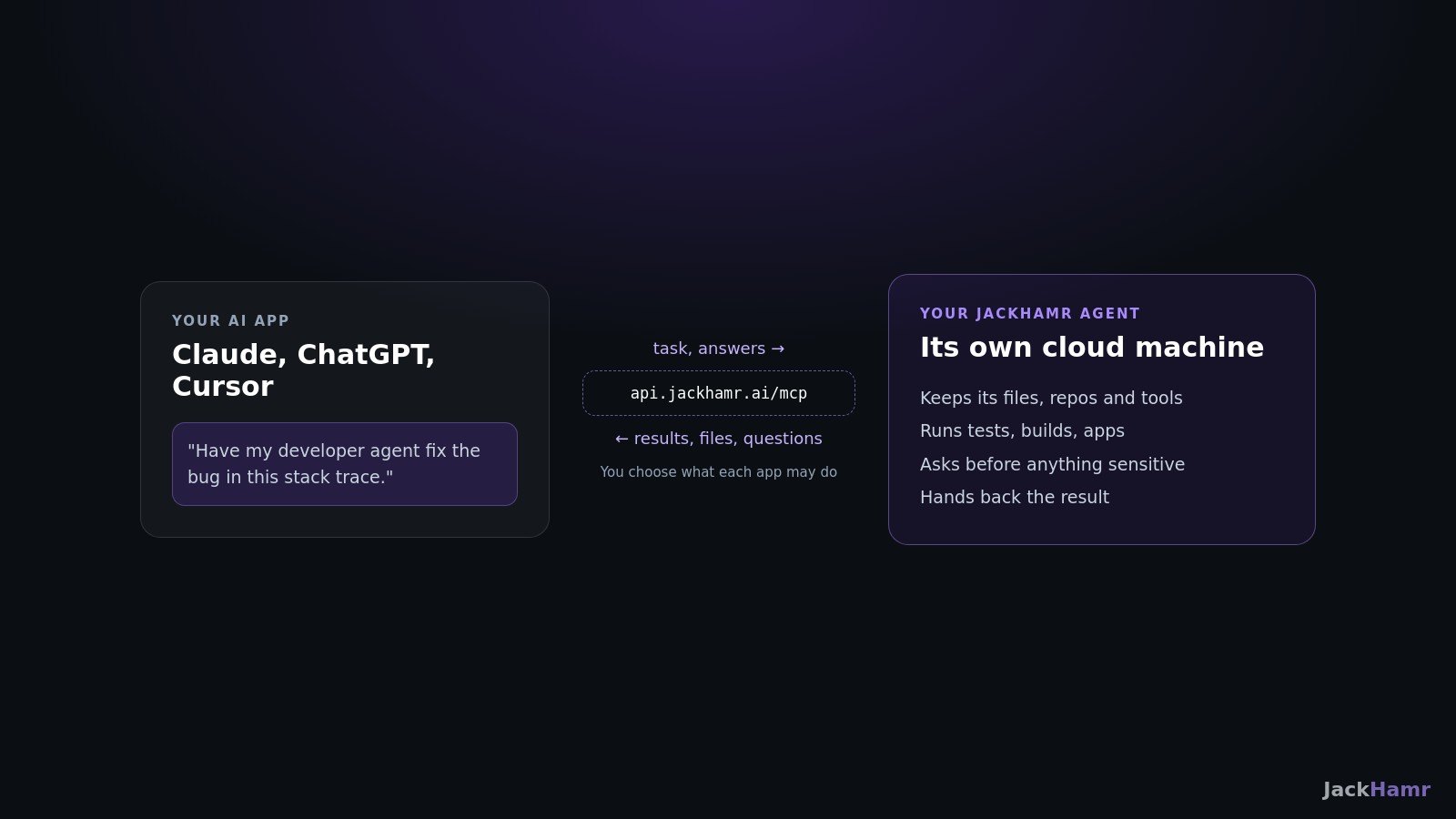
MCP (Model Context Protocol) is the open standard that Claude, ChatGPT, Cursor and many other apps use to plug in outside tools. JackHamr now has a public MCP server, so any of them can reach your agents.
What you can do from Claude or ChatGPT
- "Have my Marketer agent draft three posts about our new pricing and show me them."
- "Run the spec, build, QA workflow on this feature idea."
- "What are my agents waiting on me for?" lists every open question and review across all of them. Then "Approve the spec" or "Go with option B", and the agent carries on.
- "Get me the report it wrote." Files and artifacts come back into the chat, and preview links for apps running on the agent's machine.
- "Every weekday at 9, have Marketer check ad spend and post a summary." Schedules and autonomy can be set up from the chat too.
- "Run the tests on my agent's machine and tell me what fails." This is the one people do not expect: Claude can use your agent's computer like a cloud workstation.
Follow-ups in the same conversation continue the same topic, so the agent keeps its context. Each task also comes with a link, so you can open JackHamr and watch the agent work live whenever you want.
You choose what each app can do
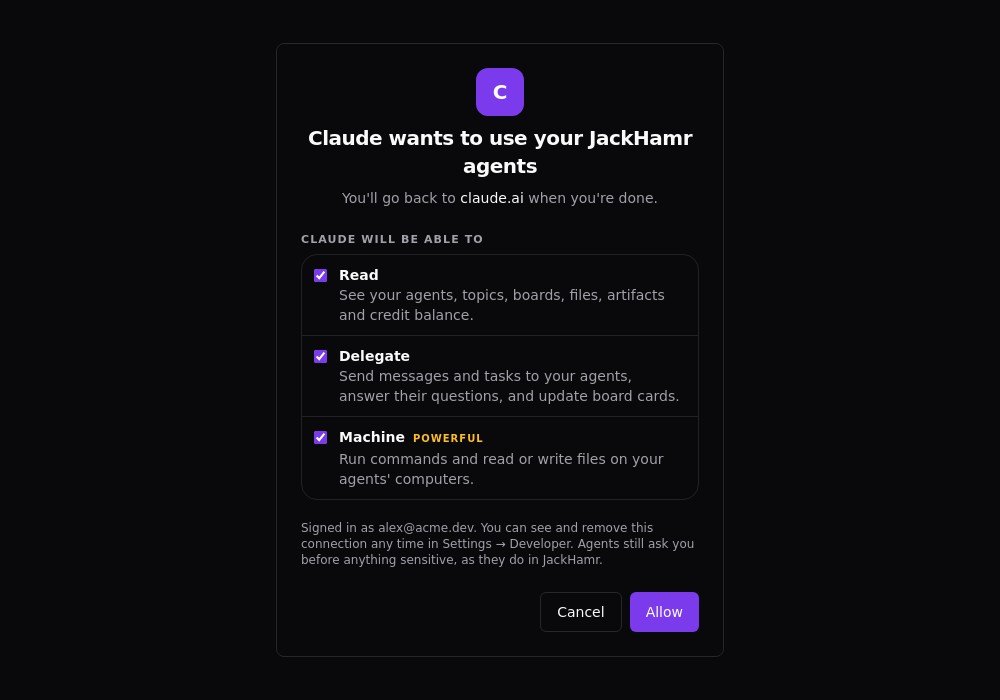
Connecting an app takes you to a normal "Sign in to JackHamr" screen, where you pick a workspace and what the app may do:
- Read: see your agents, topics, boards, files, artifacts and credit balance
- Delegate: send tasks and messages, answer your agents' questions, update board cards
- Automate: turn on autonomy in a topic, create or change schedules
- Machine: run commands and read or write files on your agents' computers
- Manage agents: create, start, stop and hibernate agents
Apps ask for Read and Delegate by default. The app only sees the tools you allowed. Your agents still ask before anything sensitive, exactly as they do in JackHamr, and when an agent is waiting on a decision, the app shows you the question instead of answering it for you. Machine access is limited to an agent's owner or a workspace admin, and a connection made for one workspace cannot reach another. Remove an app from Settings and it is signed out immediately.
How to connect
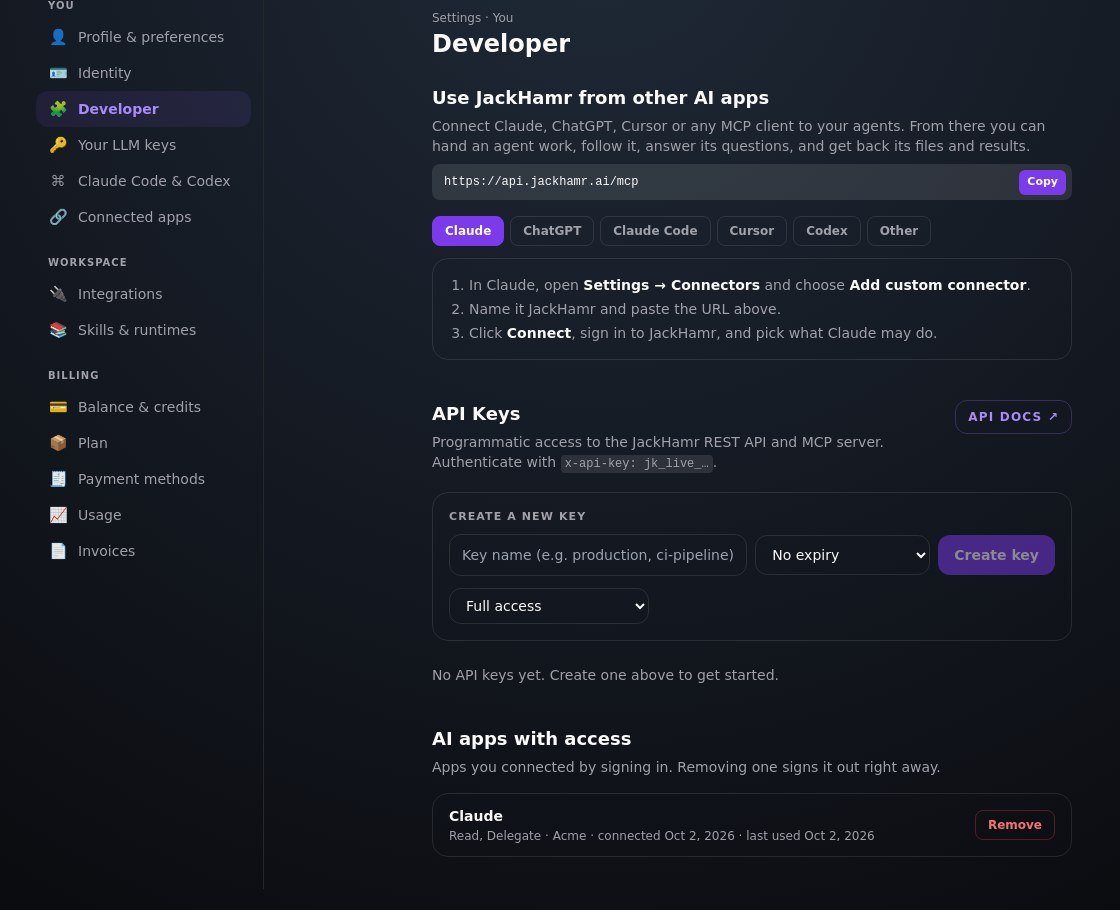
The address is the same for every app: https://api.jackhamr.ai/mcp
- Claude (web and desktop): Customize, Connectors, then Add custom connector. Paste the address, click Connect, sign in to JackHamr and choose permissions. On Team and Enterprise plans, an owner adds it first under Organization settings.
- ChatGPT: turn on Developer mode, then create an app with the address and choose OAuth sign-in.
- Claude Code: run claude mcp add --transport http jackhamr https://api.jackhamr.ai/mcp, then /mcp to sign in.
- Cursor: add the address as an MCP server in your Cursor MCP settings.
- Codex CLI and other tools: use an API key from Settings, Developer, which can be limited to the permissions you choose.
Full setup steps for each app are in the docs at jackhamr.ai/docs/mcp and inside JackHamr under Settings, Developer, "Use JackHamr from other AI apps". Connecting costs nothing extra: agent work uses credits exactly as it does inside JackHamr.
What is next
We are submitting JackHamr to the Claude and ChatGPT app directories and the MCP registries, so you will be able to add it with one click. Until then, the custom connector steps above are all it takes.
Keep chatting where you already chat. Let an agent with a real computer do the work.
More releases

Grant an agent your inbox
Gmail, Slack, Notion, Linear, HubSpot and 1,500 more apps, granted one agent at a time, denied by default. Plus your own MCP servers with OAuth.
2 min read

Everything you can click, you can now call
A build fails at two in the morning and your CI job hands the log to an agent. The v1 API puts agents, chat, boards, organizations, and billing behind a personal key.
1 min read
Talk to your agents in Slack
Connect any conversation to a channel. Agents post as themselves, approval cards become buttons, and the team directs the fleet where it already lives.
1 min read